AI Is Easy. Systems Are Hard. This Is How You Bridge the Gap.
A lot of teams use AI every day and still fail to get real operational leverage from it.
The reason is simple: they keep AI in the chat box.
They ask AI to summarize, draft, classify, analyze, write, or recommend. The output may be useful, but it often stays disconnected from the systems where work actually happens.
A summary sits in a document. A draft waits in a thread. A classification never updates the CRM. A recommendation never becomes a task. A report insight never creates an owner or a next action.
That is not production AI.
To get production value, you need a bridge from AI output to system action.
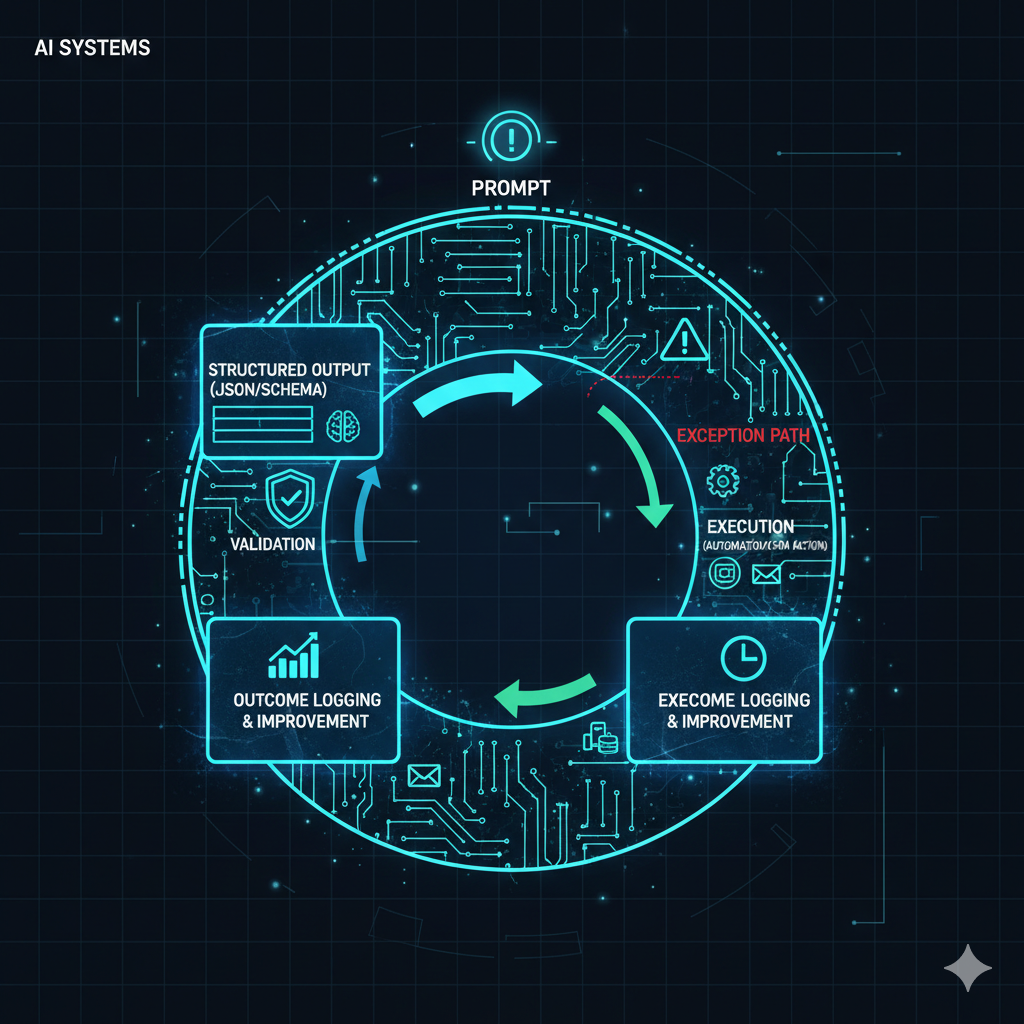
That bridge is structure, validation, execution, and logging.
What Does “Prompt to Production” Mean?
Moving from prompt to production means turning AI outputs into reliable workflows that can operate inside business systems.
A prompt is a request. A production workflow is a controlled process.
The difference matters.
In a chat box, the output only needs to be useful to a human. In production, the output may need to update a CRM, assign an owner, trigger a webhook, create a task, prepare a customer-facing message, classify a lead, or route an exception.
That requires more than a good prompt.
It requires a workflow that can answer:
- What structure should the AI output follow?
- Which fields are required?
- Which values are allowed?
- What happens if the output is incomplete?
- What system action should happen next?
- When is human review required?
- How are errors handled?
- What gets logged?
- How does the workflow improve over time?
That is the operational layer that separates AI experimentation from AI infrastructure.
The Core Pattern: Structured Output, Validate, Execute, Log
The simplest reliable pattern is:
Structured output → validate → execute → log.
This pattern keeps AI useful without letting it become uncontrolled.
AI can help interpret messy inputs, summarize context, classify intent, draft messages, or recommend actions. But before that output triggers business action, the system needs structure and checks.
Otherwise, AI becomes a fluent generator of fragile workflows.
Step 1: Make AI Output Structured Data
The first step is to make AI output structured data, not just prose.
Prose is useful for humans, but systems need predictable formats.
Structured output can be:
- JSON;
- a fixed table;
- a schema-based response;
- a set of labeled fields;
- a controlled classification;
- a standardized summary format;
- a predefined decision object.
For example, instead of asking AI to “summarize this lead,” the workflow might ask for:
- lead summary;
- declared intent;
- service category;
- urgency level;
- missing information;
- recommended owner;
- recommended next action;
- confidence score;
- human review required: yes or no.
That structure reduces ambiguity. It also makes the output easier to validate before anything happens downstream.
Step 2: Validate Before Anything Executes
Validation is what keeps AI workflows trustworthy.
Before an AI output updates a CRM, sends a message, assigns an owner, or triggers a follow-up sequence, the system should check whether the output is complete and valid.
Validation can include:
- required field checks;
- allowed value checks;
- format checks;
- duplicate checks;
- confidence threshold checks;
- policy or guardrail checks;
- CRM field mapping checks;
- human approval rules;
- exception path routing.
For example, if the AI classifies a lead into a service category, the value should match an approved list. If the AI recommends an owner, the owner must exist in the CRM. If the AI marks urgency as high, the workflow may need a reason. If confidence is low, the output should route to human review instead of executing automatically.
Validation prevents silent failures.
Without it, bad outputs can move through the system as if they are reliable.
Step 3: Use Exception Paths Instead of Silent Failure
A production workflow should not break quietly.
If validation fails, the system needs an exception path.
An exception path defines what happens when the output is incomplete, invalid, uncertain, duplicated, risky, or missing required information.
Examples include:
- route to an operations review queue;
- create a task for manual review;
- send an alert to the workflow owner;
- ask the user for missing information;
- hold the CRM update until approval;
- use a safe fallback message;
- log the error and stop execution.
This is one of the differences between a demo and a production workflow. A demo can fail invisibly. A production workflow needs a known failure path.
Step 4: Execute Only After Validation
Execution should happen only after the output passes validation.
Execution is where the workflow does something real.
That might include:
- creating or updating a CRM record;
- assigning a lead owner;
- creating a follow-up task;
- triggering an email sequence;
- sending a draft for human approval;
- routing a lead by service interest;
- updating a lifecycle stage;
- opening a support ticket;
- sending an internal alert;
- passing data into a dashboard or reporting system.
This is where AI starts creating operational value.
But the order matters. Execute after validation, not before it.
Step 5: Log What Happened
The workflow should log what happened at each important step.
Logs are what make the system diagnosable and improvable.
A useful AI workflow log may include:
- workflow run ID;
- trigger source;
- input summary;
- AI output;
- validation result;
- confidence score;
- execution path;
- CRM updates made;
- owner assigned;
- exception path used;
- human approval status;
- final workflow status;
- business outcome when available.
Without logs, the team cannot answer basic questions when something goes wrong.
Did the AI output the wrong category? Did validation fail? Did the CRM reject the update? Did the workflow route to the wrong owner? Did a human approve or change the message?
If the system cannot answer those questions, it is not production-ready.
Step 6: Close the Loop With Outcomes
Logging execution is useful. Logging outcomes is even more valuable.
A workflow can execute correctly and still produce weak business results. A lead can be classified cleanly but still become disqualified. A follow-up draft can be valid but fail to get a reply. A routing path can work technically but still send low-quality leads to sales.
This is why production AI workflows should connect to outcome logging.
Outcome logging helps improve both the prompts and the process.
Useful outcomes may include:
- lead qualified;
- lead disqualified;
- reply received;
- call booked;
- no-show;
- task completed;
- human edited the AI output;
- message approved or rejected;
- deal created;
- closed won;
- closed lost;
- lost reason;
- workflow error category.
Those outcomes show whether the AI workflow is creating useful business movement, not just valid outputs.
When to Use AI Agents vs Classic Automation
This production pattern also clarifies when to use an AI agent and when to use classic automation.
If the task is deterministic, use automation.
If the task requires interpretation, classification, summarization, or judgment support, use an AI agent, but keep it inside a validated system.
Examples of deterministic automation include:
- send a form submission to the CRM;
- assign a lead based on a selected dropdown;
- send a confirmation email after a booking;
- update a status when a payment is received;
- notify an owner when a required field is missing.
Examples where an AI agent may help include:
- classify intent from an open-text inquiry;
- summarize a sales call transcript;
- extract missing context from a long message;
- suggest a next action based on multiple inputs;
- draft a follow-up using verified CRM context;
- flag uncertainty or risk for human review.
For a deeper comparison, see AI agents vs automations.
Intent Routing Is Often the First Production Use Case
Many production AI workflows begin with inbound requests.
A lead submits a form. A customer sends a message. A prospect writes a messy inquiry. A support request lands in a shared inbox. A sales call transcript needs action items.
The first job is often routing.
What is the person asking for? Which service does it relate to? Is the request urgent? Who owns the next action? Does the workflow need human review? What should happen next?
This is why production AI workflows connect naturally to intent routing.
AI can help interpret messy inputs, but the routing system still needs structure. The AI should not freely invent categories or owners. It should classify against approved options, provide confidence, and route exceptions when needed.
How This Connects to Workflow Orchestration
Prompt-to-production workflows are part of workflow orchestration.
The AI is one component inside a larger path. The workflow still needs entry points, validation, routing logic, execution steps, alerts, logs, and outcome tracking.
Without orchestration, AI outputs can become disconnected artifacts. A summary goes to one place, a CRM update happens somewhere else, a notification fires in another tool, and nobody knows which system owns the process.
For more on that operating layer, see workflow orchestration.
Common Prompt-to-Production Mistakes
AI production workflows usually fail when teams skip the system layer.
Avoid these mistakes:
- Using prose where structured data is needed. Systems need predictable fields, not only well-written text.
- Skipping validation. AI output should not trigger actions without checks.
- Letting AI invent categories. Use approved values and exception paths.
- Executing before review when risk is high. Human approval should match the risk level.
- No logging. If you cannot diagnose what happened, the workflow is not reliable.
- No outcome loop. If you do not record results, prompts and process rules cannot improve.
- Using agents where automation is enough. Do not add interpretation to deterministic tasks.
- Keeping AI disconnected from CRM and workflow systems. Output needs a destination and next action.
A Practical Prompt-to-Production Blueprint
A simple production workflow can follow this blueprint:
- Define the business goal: what action should AI help move forward?
- Define the input: form response, transcript, message, CRM note, document, or event.
- Define the schema: what structured output should AI return?
- Set allowed values: categories, owners, statuses, urgency levels, service interests, or next-action types.
- Add validation: required fields, confidence thresholds, duplicate checks, and guardrails.
- Build exception paths: route incomplete, invalid, risky, or low-confidence outputs to review.
- Execute approved actions: update CRM, assign owner, create task, send notification, or trigger follow-up.
- Log the run: record the input, output, validation result, execution path, and errors.
- Log the outcome: record whether the workflow created the intended business result.
- Improve the prompt and workflow: refine prompts, rules, schemas, and routing based on logged results.
Where This Fits Inside a Connected Growth System
Prompt-to-production work sits between AI strategy, workflow orchestration, CRM systems, automation, routing, and measurement.
For Veltiqo, the first service path is AI Upgrade for Business Needs, because many companies need help identifying where AI can create practical operational value instead of isolated chat outputs.
The execution layer connects to Automations, Webhooks & CRM Systems, because production workflows usually require webhooks, CRM updates, routing rules, validation logic, and system integration.
When the workflow requires interpretation, classification, summarization, or agent logic, the fit is AI Agents & Automated Workforce Systems.
At the category level, this belongs inside AI Automation Business Systems, where AI is treated as part of a reliable operating layer rather than a disconnected tool.
Final Thought: AI Output Is Only the Start
A good prompt can create a useful answer.
A production workflow creates a reliable business action.
That is the real gap teams need to close.
AI outputs need structure. Structure needs validation. Validation protects execution. Execution needs logs. Logs create learning. Learning improves both the prompt and the workflow.
That is how AI moves from helpful chat output to operational leverage.
The prompt is the start.
The system is the value.